
FinePrint Platform
The FinePrint platform
How the five parts of FinePrint work together
Your Legal AI Team does two jobs. Legal AI Counsel (FinePrint Counsel) does the legal work. Legal AI Firewall (FineShield) is legal autocorrect for email, Slack and calls: it flags legal risk as it happens. Both work from your Legal Room, run on FinePrint LM, and are reviewed by lawyers in AnswerLoop.

Platform
Five parts, one company record
The two halves of your Legal AI Team, the record they work from, the model behind them, and the place lawyers review the work. Select a part to see what it does and what it connects to.
FinePrint Counsel: Legal AI Counsel
Counsel, the team lead, and eight specialist teammates answer legal questions and prepare legal work from your company’s records: 101 tasks across eight areas of company law. Counsel shows the plan and what it will cost before it starts. Work that needs additional legal judgment waits for a lawyer’s review.
Explore FinePrint Counsel- Connects to
- Legal Room It reads your agreements, facts and decisions first, and saves the finished work there.
- FinePrint LM The model that drafts the work.
- AnswerLoop Work that needs a lawyer’s judgment goes here for review.
FineShield: Lawyer-Trained Legal AI Firewall
FineShield is legal autocorrect for what your people write and say in email, Slack and meetings. It checks their words against your contracts, policies and approval limits, and flags legal risk while it can still be fixed. Email and Slack wait at Send. On a call, the rule appears before you answer.
Explore FineShield- Connects to
- Legal Room The contracts, policies and approval limits it checks against.
- FinePrint LM The model that checks each message.
- AnswerLoop Lawyers review and correct FineShield’s work here.
Legal Room: your company’s legal record
The Legal Room keeps your company’s documents, facts and decisions in one place, with answers tied to their sources and access you control. Both products work from it, and checked work is saved back into it, so the next request starts from what your company has already decided.
Explore the Legal Room- Connects to
- FinePrint Counsel Reads it before drafting; saves the finished work.
- FineShield Checks messages against the rules kept here.
- AnswerLoop The lawyer’s review record is saved with the work.
AnswerLoop: where lawyers review the work
AnswerLoop is where lawyers review and correct FinePrint’s legal work and record the reason. Legal work follows a process lawyers approved and sample-check. The lawyer agrees, modifies the work or sends it back, and what changed and why stays with the matter.
Explore AnswerLoop- Connects to
- FinePrint Counsel and FineShield Both send work here for review.
- Legal Room Checked work and the review record are saved there.
- FinePrint LM Lawyers’ corrections are how the model improves.
FinePrint LM: the legal model
FinePrint LM is the legal AI model behind FinePrint Counsel and FineShield. Lawyers review and correct its work in AnswerLoop, and those corrections are how FinePrint LM improves. Your company’s records are read by the model when it works for you; they are not what it is trained on.
Explore FinePrint LM- Connects to
- FinePrint Counsel Drafts the legal work.
- FineShield Checks each message against your rules.
- AnswerLoop Receives lawyers’ corrections.
What that gives you
Your records, your rules, lawyers in the loop
-
Work from your own records
Answers and documents start from your agreements, facts and decisions in the Legal Room, not from a generic template. Every answer is tied to its source.
-
Lawyers in the loop
Legal work follows a process lawyers approved and sample-check. Work that needs additional legal judgment waits for a lawyer’s review in AnswerLoop, and the reason is recorded.
-
Legal autocorrect where people work
FineShield flags legal risk in email, Slack and meetings as people write and speak, so the question reaches the right person before the message goes out.
The five parts
Each part, in a screen
FinePrint Counsel
Legal questions answered. Legal work done.
Ask Counsel for an outcome in your own words. Before any work begins, Counsel shows what the team will prepare, the facts it still needs and what the task will cost. Then the specialist teammates prepare the documents from your Legal Room and list the issues they found.
Explore FinePrint Counsel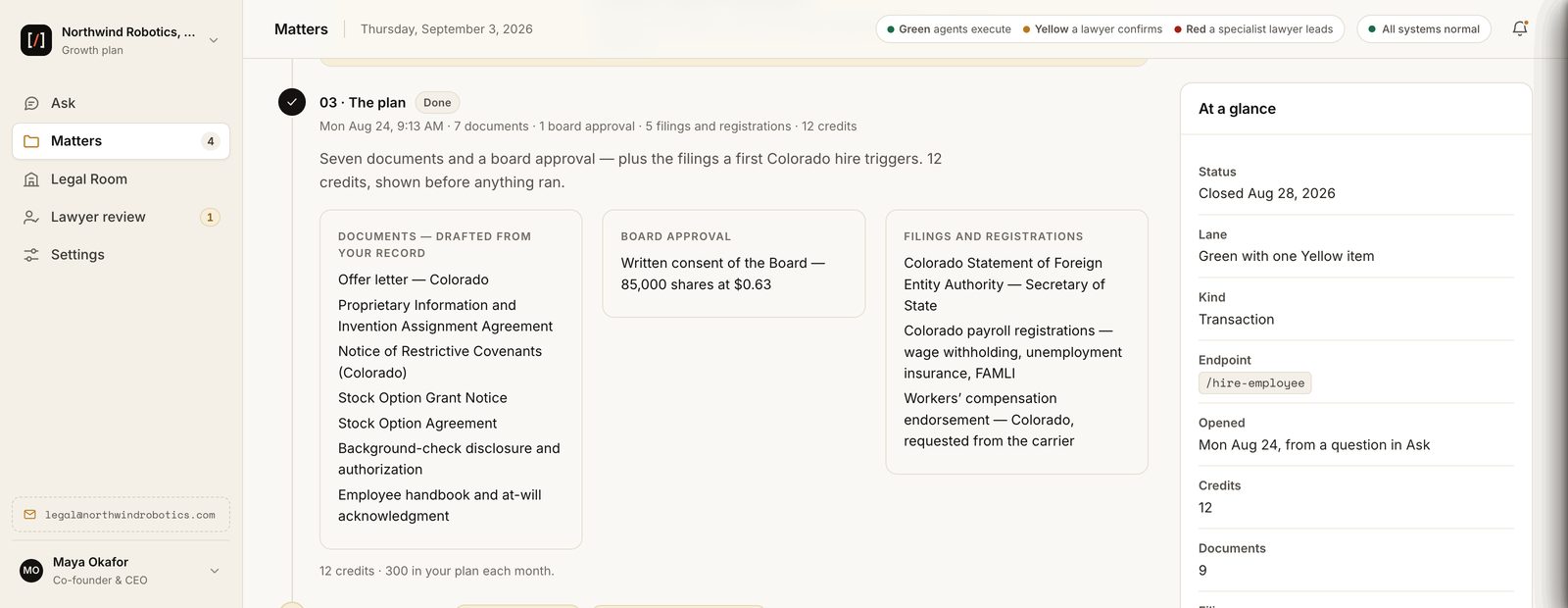
FineShield
Legal autocorrect for email, Slack and meetings
FineShield checks each message against your contracts, policies and approval limits. When it finds a problem, it names the clause or policy that applies and who should decide, and keeps the record. The dashboard shows every flag and what was decided.
Explore FineShield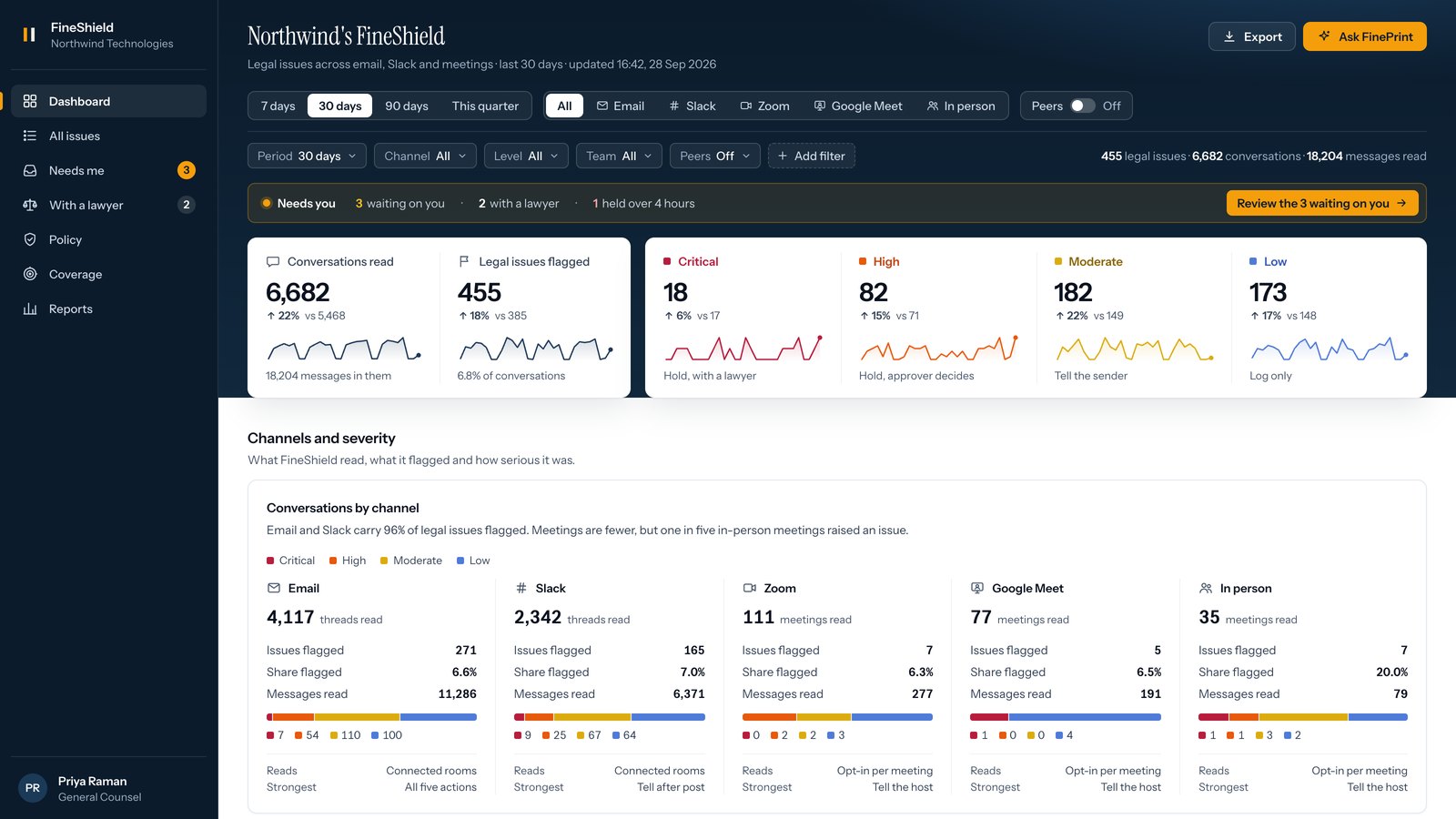
Legal Room
Your company’s legal record, kept in one place
Signed agreements, ownership records, approved policies and the decisions your company has made, with answers tied to their sources. You control who sees what. Both products read from it, and checked work is saved back into it.
Explore the Legal Room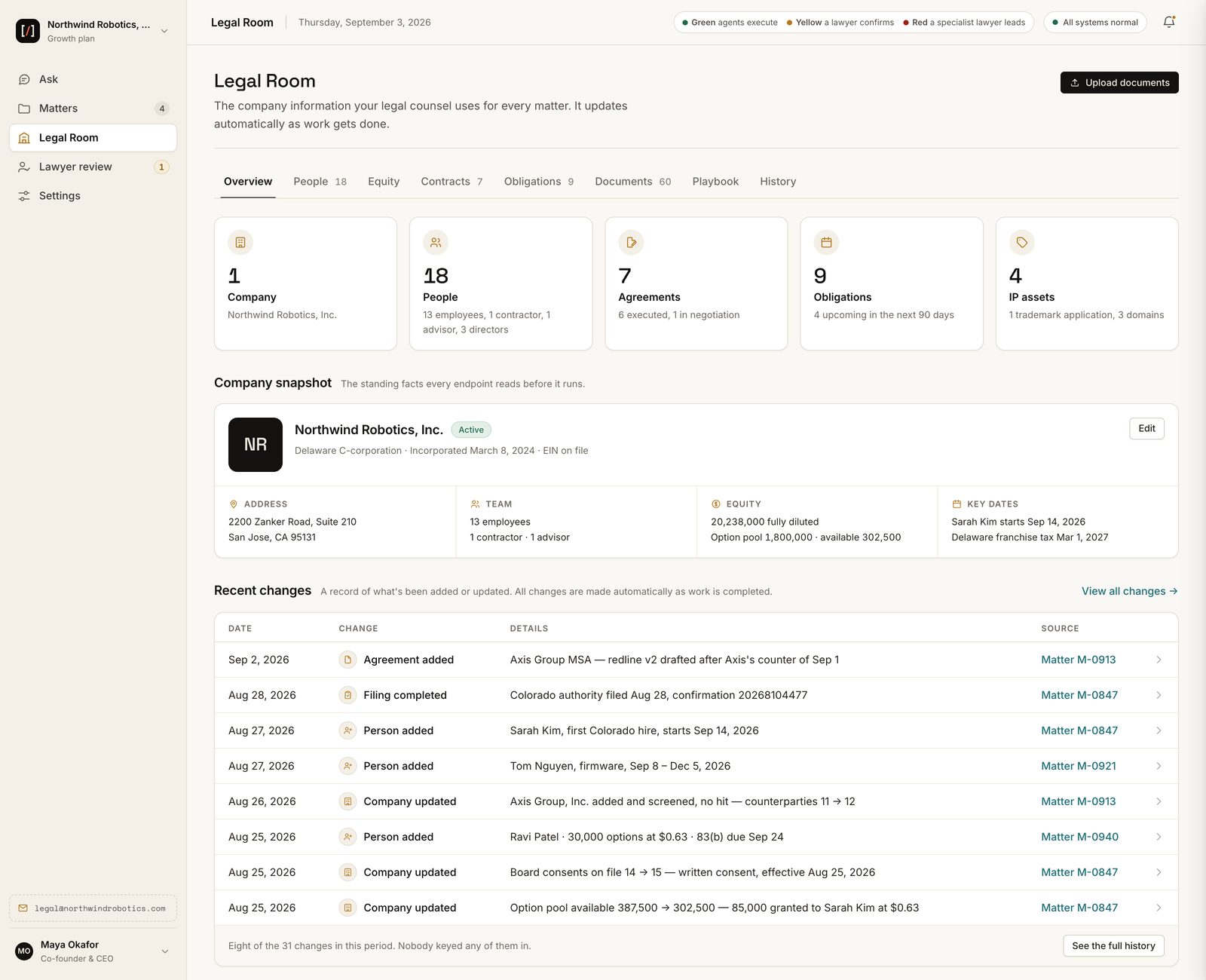
AnswerLoop
Lawyers review and correct the work
A lawyer sees the scope they were asked to review and the answer, then agrees, modifies it or sends it back for rework, and records the reason. Your matter shows which questions went to a lawyer and what the lawyer decided.
Explore AnswerLoop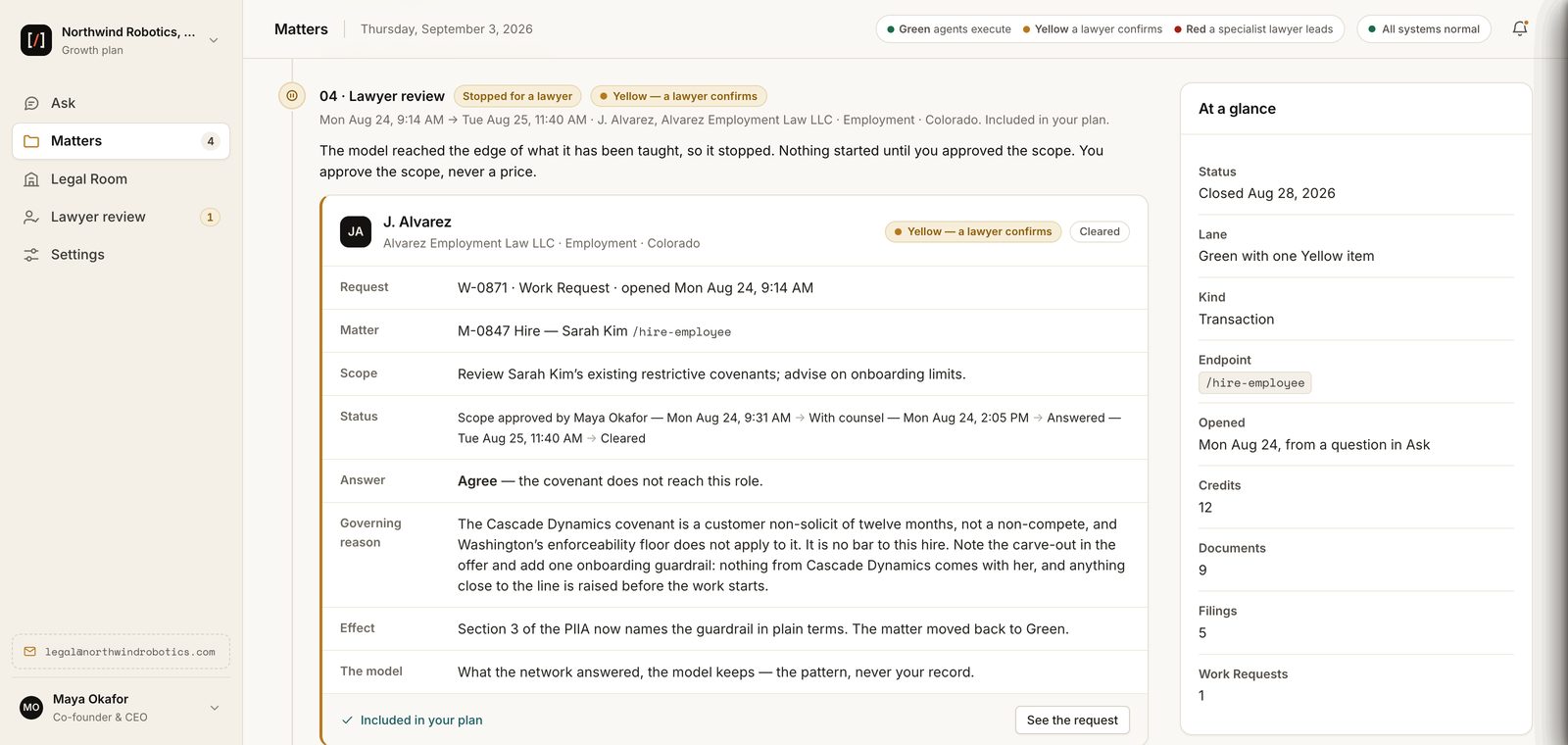
FinePrint LM
The legal model, improved by lawyers’ corrections
FinePrint LM is the model behind both products. It drafts the legal work and checks each message. Lawyers’ corrections in AnswerLoop are how it improves, so the next draft starts from what a lawyer has already corrected.
Explore FinePrint LM
End to end
One request, through all five parts
A contract, a hire, a board consent or a diligence request all move the same way.
- You ask Counsel, your team lead, in your own words. It shows the plan and what it will cost before any work begins.
- Counsel reads the Legal Room and hands each part to the specialist teammate for that area, who prepares it with FinePrint LM. When a fact is missing, Counsel asks instead of guessing.
- Work that needs additional legal judgment waits for a lawyer’s review in AnswerLoop. The lawyer agrees, modifies it or sends it back, and records why.
- The finished work and the review record are saved in the Legal Room, ready for the next request.
- The lawyer’s correction trains FinePrint LM, and FineShield applies the same rules to your email, Slack and meetings.
Questions
About the platform
Do I have to use all five parts?
No. Counsel and FineShield are the two halves of your Legal AI Team, and each works on its own. The Legal Room, FinePrint LM and AnswerLoop are part of both, so whichever you use, the work comes from your records and is reviewed by lawyers.
Who are the lawyers in AnswerLoop?
Licensed lawyers and legal professionals who applied and were approved as reviewers. They review and correct the work and record the reason. See what lawyers review, and what they do not.
Is my company’s data used to train FinePrint LM?
No. FinePrint LM reads your records when it works for you. It improves from lawyers’ corrections in AnswerLoop, not from your documents. See how company records are kept and who sees them.
Where do I start?
Startups start with FinePrint Counsel through the LaunchPad. Enterprise teams start with FineShield; see FinePrint for enterprise.
Start with the task on your desk
Qualified applicants get 60 days of their Legal AI Team free, with lawyers supervising the work in AnswerLoop. No card. No automatic subscription.