
FinePrint For enterprise
For enterprise · The Lawyer-Supervised Legal AI Team
A sales director promises more than the contract says
Last day of the quarter. A customer is nervous after an outage. Your sales director replies from the airport: “We will cover all your losses.” The contract caps liability. Nobody in legal sees the email. It sends. You can’t put a lawyer in every email, every Slack channel and every call. Your Legal AI Team can be in all of them.

- From
- Sales Director
- To
- Customer, VP Operations
- Subject
- Re: Tuesday’s outage
Sorry again about Tuesday. I know it hit your month-end run.
We will cover all your losses. Let’s get the renewal signed today and I’ll make sure this never happens again.
The email surfaces later, in the dispute
The customer’s lawyer quotes the email in the claim. Your lawyers spend weeks piecing together what was said, in which thread, by whom, with what authority. The contract said one thing. Your company, in writing, said another. Every offer to settle starts from the email.
“Your sales director confirmed in writing that you ‘will cover all your losses.’ Our client relied on that assurance. The cap in section 9.2 does not apply to it.” From the customer’s claim letter


Your legal risk does not live in contracts. It lives in conversations.
It is not one email. Every day, people at your company make promises, share information, and take decisions in tools nobody in legal reads. AI assistants now write some of those messages. Six that create legal risk:
- Email
“We will cover all your losses,” sent to a customer whose contract caps liability.
- Slack
A manager writes that a candidate should be rejected because she is pregnant.
- Slack or email
A customer’s data is forwarded to someone with no right to receive it.
- Zoom
A salesperson tells a buyer every security requirement is met. Nobody checked.
- In person
Two competitors agree at a conference to keep prices where they are.
- AI assistant
A support bot promises a refund the policy does not allow.
What you rely on today acts too early or too late
Policies and training
Everyone read the policy once. Nobody has it open when they write the email.
Review after the fact
The archive finds the message after the customer has it.
Outside counsel
Billed at $500 to $1,000 an hour to work out what was said, once it is a dispute.

Legal AI Firewall
How the Legal AI Firewall flags legal risks before they escalate
One sentence can commit your company: a promise the contract does not allow, customer data sent to the wrong person, a discriminatory remark on a Zoom call. By the time a lawyer sees it, it is already out. FineShield, the Lawyer-Trained Legal AI Firewall in your Legal AI Team, is legal autocorrect for connected email, Slack and Zoom: it flags the risk as it happens, while it can still be fixed.

Sorry again about Tuesday. I know it hit your month-end run.
We will cover all your losses. Let’s get the renewal signed today and I’ll make sure this never happens again.
- Conflicts with
- Master Services Agreement, section 9.2: liability capped at fees paid in the prior 12 months
- Authority
- Changes to liability terms need VP Sales approval
Safer wordingWe will apply the service-level terms set out in our agreement, and I will call you today to walk through them.
Three ways FineShield reduces legal risk
Flag risky wording before it goes out
Like autocorrect, FineShield flags words as they are written, here the ones that conflict with your contracts or policies. It shows the source and suggests wording that stays within the rules.
Put the decision in the right hands
A promise beyond the sender’s authority goes to your designated approver. A question that needs legal judgment goes to your lawyer. Your company’s approval rules decide who makes the call.
See every flag, keep every record
Each flag is logged with the clause or policy it touched, the decision, and the reason. Your legal team sees every flag across channels in one dashboard.
FinePrint for enterprise
The team that can be everywhere
For enterprise, FinePrint is FineShield: the Legal AI Firewall that brings legal autocorrect to email, Slack and meetings, flagging risk as it happens. It is set up for your company by the people who built it. It is for a company with a legal team and far more messages than that team can read.
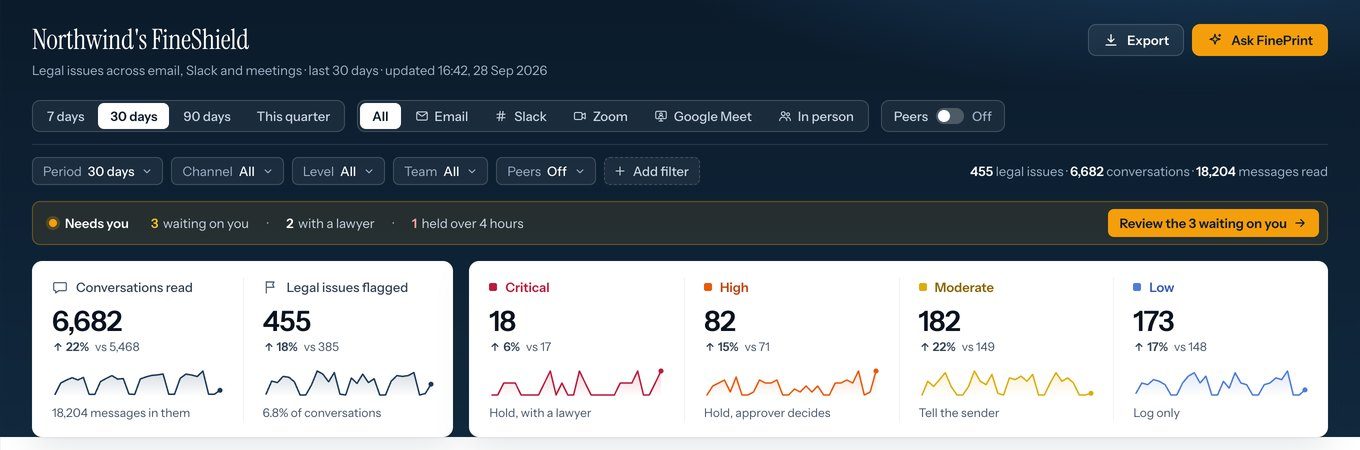
FineShield on the channels you name
Email, Slack, Zoom, Google Meet, and in-person meetings, checked against your signed contracts, your policies, and your approval limits. You get the written list of what is covered. Nothing is implied.
A view for your legal team
Every flag across channels in one dashboard: how serious it was, which team it came from, how it was decided, and who still has a decision to make.
See the dashboardA record that holds up
Each flag is logged with the excerpt, the source, the decision, and the reason. The rest of the message is not kept. The record fits your retention and legal-hold process.
Lawyers behind every rule
Lawyers review and correct FineShield’s work in AnswerLoop, and those corrections are how FinePrint LM improves. A flag cites a clause, not a hunch.

How a rollout runs
Nothing is connected until the scope is written down
Scope
Together we list the teams, mailboxes, Slack channels, and meetings FineShield will check, and the ones it will not.
Rules
The rules come from your signed contracts, your policies, and your approval limits. You name who approves business exceptions and which lawyers take legal questions.
First channel
You connect one channel. We agree how the first weeks are measured, and we walk your team through the first issues it flags.
Next channel
When the first channel runs as agreed, you add the next team or channel on the same written terms.
Your data
What your security team will ask, answered
Current security materials and deployment details are available when you evaluate the product.
Separate from training
Your contracts, policies, and company records are used for your company’s work. They are not the shared model’s training corpus.
The excerpt, not the channel
FineShield keeps the flagged excerpt, its source, the decision, and the reason. The rest of the message and the channel are not stored in that record.
Meetings agreed first
Before a Zoom, Google Meet, or in-person meeting is connected, we confirm what is captured, who sees the guidance and the records, and how retention is set.
Protected, and yours
Information is encrypted in transit and at rest. Each company’s records stay inside their own access boundary. You can export your company record and ask for it to be deleted.
FineShield holds a message only when a rule is broken
A message with no conflict goes out as normal. When one conflicts with a signed clause or an approval limit, the writer sees the rule and safer wording inside the draft and fixes it there. Only a real exception waits for the approver you name.
Are we recording employees?
No. It checks messages against your rules and shows the writer the rule. On Zoom it joins as a named participant and posts a notice.
Does the AI make legal decisions?
No. It flags, cites the source, guides, and routes. The approver you name decides business exceptions. Your lawyers decide legal questions.
Do we have to connect the whole company at once?
No. You start with the teams and channels you choose, and the list is written down before anything is connected. You add the next channel when you are ready.
How is it priced?
$20 an hour, billed by the minute it works. An email: 2 to 3 minutes. A Slack message: 30 seconds. A call: the length of the call. 100 hours of calls, 40,000 emails and 10,000 Slack messages come to 1,850 hours: $925,000 for a lawyer at $500 an hour, $37,000 for your Legal AI Team at $20. Nobody hires that lawyer. Enterprise work is billed by the hours your Legal AI Team works, with volume terms agreed with you before anything is connected. See the plans
Talk to our team about your company
Tell us which teams and channels you want to start with. Before anything is connected, we confirm which mailboxes, Slack channels, and meetings are in scope, who approves what, and where the records go. Then you connect the first channel.
Other FinePrint products